Web tables to clean Excel, without copy-paste.
Bastion Helix Tables finds the tables on any web page and turns them into clean spreadsheets: real numbers and dates, tidy columns, every page of results. Then it hands them to ChatGPT, Claude or Le Chat when you ask.
Hi, I'm Bix! Here's Tables in under two minutes.
Prefer YouTube? Watch it there →
Copying a table should not take an afternoon.
Finds the real data tables
Ordinary HTML tables, tables inside frames and accessible data grids. Merged cells are filled in, stacked headers become one (“Population / Metro”), and layout tables and navigation boxes are skipped.
Understands values
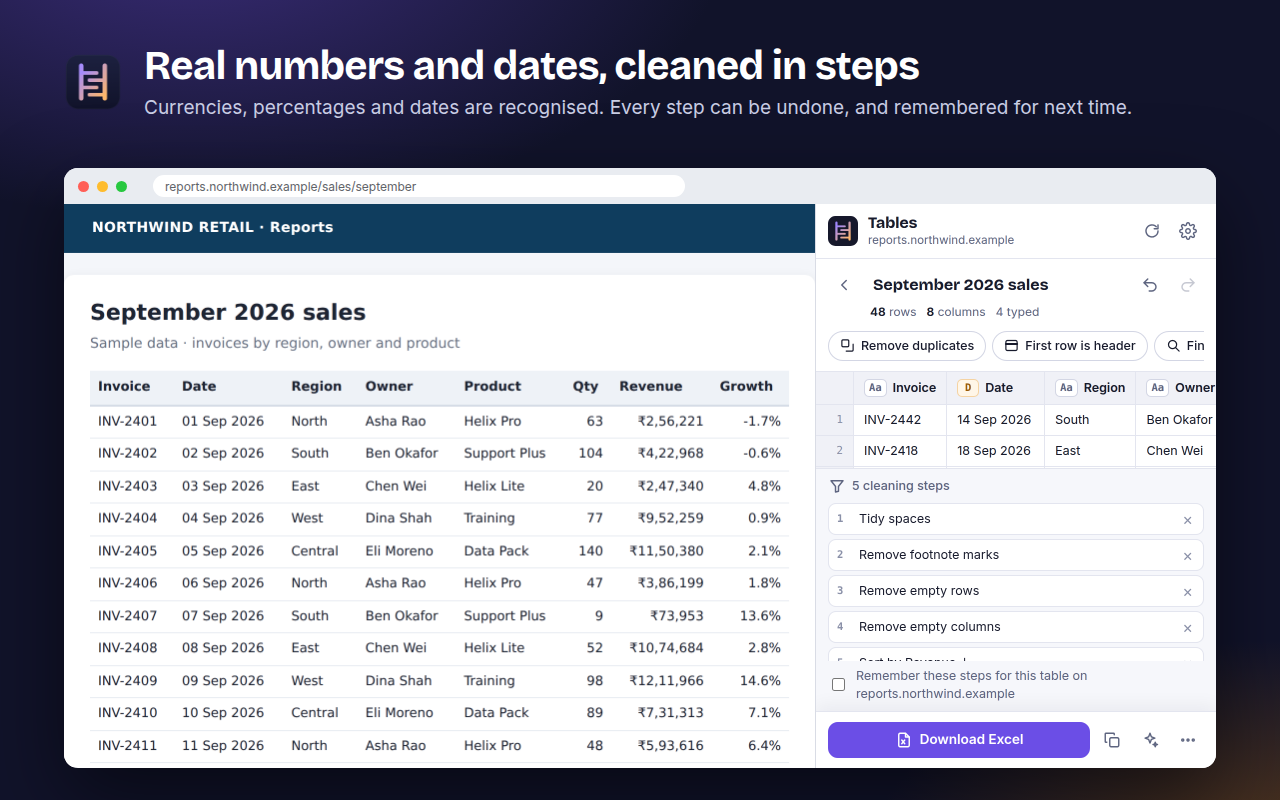
Numbers, currencies (₹, $, €, £ and more), percentages and dates, including Indian 1,23,456 and European 1.234,50 formats. A column that mixes kinds of values stays as text, so nothing is silently changed.
Cleans in steps you can undo
Remove duplicates, sort, filter, rename, split and join columns, find and replace, change case, fill blanks, tidy emails and phone numbers. Tick a box and the same steps run next time on that site.
Captures every page
Point at the page’s “Next” button once. The panel clicks through the pages, adds the new rows and skips the duplicates.
Exports what you need
An Excel file with typed cells, a frozen header, filters and an “About” sheet recording the source; several tables in one workbook; CSV, JSON and Markdown; a copy that pastes into Excel or Google Sheets.
Hands tables to AI
Connect ChatGPT, Claude or Le Chat with a private link, and ask about the table you have open. Any other chat works with “Send to an AI chat”: the table is copied with its source and the chat opens.
Three steps from page to spreadsheet.
Click the icon
On any web page, click the Bastion Helix Tables icon (or press Alt+Shift+T). A side panel lists the tables it found, largest first.
Pick and clean
Point at a table to see it outlined on the page, click it, and clean it in steps you can undo.
Export or ask
Download Excel or CSV, copy it into Google Sheets, or ask your AI app about it.
Ask your AI app about the table you have open.
Switch on Online AI apps in the extension’s settings to get a private link, then add it to your AI app once. When you ask, the app gets the cleaned table with typed columns and its source, not a screenshot or raw page text. We connected each of these ourselves, ChatGPT and Le Chat on their free plans:
ChatGPT · free plan included
Plugins › Add › Add custom MCP server. Paste the link under Connection (Server URL), choose No authentication, tick “I understand”, then Create as a plugin.
Claude · claude.ai
Settings › Connectors › Add custom connector. Paste the link as the URL and choose No sign-in.
Le Chat · Mistral, free plan included
Context › Connectors › Add connector › custom connector. Paste the link as the Server and choose no authentication.
Requests reach your panel through the Bastion Helix relay on Cloudflare. Tables pass through in memory, are never stored, and only flow while the panel is open. For AI apps on your own computer, such as Claude Desktop, a free add-on that keeps everything on your machine is in testing.
- Your link holds a long random secret made in your browser
- “Make a new link” cuts off the old one at once
- Switching the setting off disconnects the relay
- Gemini, Copilot and Perplexity: use “Send to an AI chat”
It reads a page only when you ask.
Bastion Helix Tables reads a page only after you click its icon there, or on a site you chose to allow. It has no account, no analytics and no tracking, and it loads nothing from the internet: its code and fonts ship inside it. Read the full privacy policy →
- Tables are processed in your browser
- Settings stay in Chrome on your computer
- Nothing goes to Bastion Helix unless you switch on online AI apps
- Removing the extension deletes its data
Straight answers.
Does Bastion Helix see my tables?
No, not unless you switch on the online AI connection. Tables are found, cleaned and exported inside your browser. With the online connection on, a table your AI app asks for passes through our relay to that app; the relay keeps it in memory for that request only and stores nothing.
Which pages can it read?
Only the page in front of you, and only after you click the icon there (or on a site you chose to allow). It reads the tables on that page, not your other tabs, history, passwords or what you type into forms.
Which AI apps does it work with?
ChatGPT, Claude (on the web) and Le Chat connect live with your private link; we tested all three ourselves, ChatGPT and Le Chat on their free plans. An add-on for AI apps on your own computer, such as Claude Desktop, is in testing. Gemini, Copilot, Perplexity and any other chat work with “Send to an AI chat”.
Is the private link safe to share?
Treat it like a password: anyone with it can read the tables in your panel while the panel is open. “Make a new link” cuts off the old one straight away.
What does it cost?
It is free during early access, with every feature on. If paid plans are introduced, they will be announced on this page before they start.
Does it work with Microsoft Edge or Brave?
It is built and tested for Google Chrome. Other browsers built on Chromium may run it, but we have not tested them, so we do not promise it.
Now on the Chrome Web Store.
Install Bastion Helix Tables from the Chrome Web Store. Every feature is free during early access.
Questions, or a page where it misses a table? Email support@bastionhelix.com with the page address.